
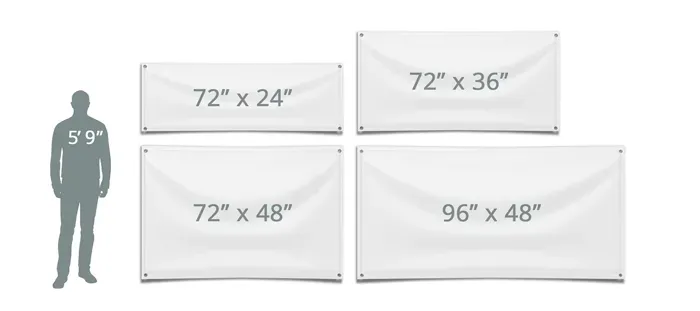
Custom Banner Dimensions shape every visual decision, setting the tone for readability, scale, and professional impact. Understanding how to select the right print banner size helps reduce blur and ensure legible copy on the final piece. From storefront signage to trade show backdrops and online placements, getting the size right anchors your message in the viewer’s context. Print-focused tasks demand bleed, DPI, and color management, while web-focused work centers on pixel dimensions and fast loading. This introductory guide highlights practical sizes and proven practices so your banners perform consistently across print and digital channels.
In practice, the concept translates into canvas choices, layout scales, and archival-ready files that stay sharp across formats. Think in terms of size specs, safe margins, and adaptable compositions rather than fixed inches alone. For online displays, consider responsive ad formats, scalable graphics, and web banner dimensions with context-aware proportions that hold up on mobile and desktop. For print projects, align with standard physical dimensions, bleed allowances, and color-managed workflows to preserve fidelity. By embracing these alternatives and maintaining a cohesive design system, you can bridge print and digital banners with confidence.
Custom Banner Dimensions: Bridging Print and Web with Consistent Sizing
Custom Banner Dimensions play a pivotal role in ensuring that your visual messaging remains crisp, legible, and on-brand whether it appears on a storefront sign or a website ad. By defining a master set of dimensions that apply across print and digital channels, you reduce guesswork, minimize distortion, and safeguard image fidelity as sizes scale. This approach anchors the concept of Custom Banner Dimensions in tangible outcomes, aligning print expectations with web rendering to protect your brand’s consistency and impact.
To implement effectively, start with a master dimension that suits your primary use case—be it a trade show backdrop or a homepage hero—and then translate that size into related print banner size options and web banner dimensions. Include bleed for print and plan for safe margins so important text and logos stay within the trim. Document a banner size guideline so teams can reproduce reliable results across campaigns and vendors while respecting print vs web banner sizes.
Understanding Banner Dimensions: How Print Banner Size Shapes Quality and Readability
Understanding banner dimensions begins with recognizing how typography, spacing, and imagery respond differently in print versus digital contexts. The banner dimensions you choose affect legibility, color fidelity, and perceived scale. Ground decisions in concrete targets for print banner size—such as inches at a defined DPI—and for web banner dimensions—pixel counts and aspect ratios—to create a predictable workflow.
Alongside these constraints, prepare a scalable asset kit: vector logos and scalable graphics for resizing, plus raster imagery at the final print size. A robust banner size guidelines framework helps ensure brand elements stay consistent as you move between print and web placements, reducing last-minute revisions and speeding up production.
Print Banner Size Essentials: Resolution, Bleed, and Color for Maximum Impact
Print banner size decisions hinge on resolution and color management. Designing at 300 DPI for the final print size ensures sharp typography and photographic detail, while considering viewing distance can adjust the effective DPI for very large banners. Bleed, typically 0.125 inches, ensures color runs to the edge after trimming and avoids white gaps along the trim line.
Color fidelity depends on using the right workflow; CMYK for most printers, or RGB where required, with fonts either embedded or outlined to prevent substitutions. Document your print banner size guidelines, save export presets, and define safe areas to protect critical elements, so banners look intentional from showroom floors to conference halls.
Web Banner Dimensions for Performance: Optimized PNG/JPEG and Responsive Scaling
Web banner dimensions must balance visual quality with fast loading. Design in classic web sizes such as 728×90, 300×250, and 160×600 to cover major ad networks, while keeping file sizes small for quick render on mobile devices. For responsive layouts, provide multiple sizes and scalable assets like SVGs for simple graphics so the same creative adapts cleanly across devices.
Beyond size, optimize color space and compression: use sRGB and export formats that fit the content—PNG for graphics with transparency and JPEG for photos. Maintaining consistent web banner dimensions across placements and documenting export presets supports reliable delivery and performance across campaigns.
Banner Size Guidelines: A Practical Framework for Multi-Channel Campaigns
A practical banner size guidelines framework reflects both print and digital channel realities. Start with a core set of primary sizes used most often, then derive secondary sizes to meet platform requirements. Including both print banner size considerations and web banner dimensions in one guideline helps teams craft assets that remain legible and on-brand whether they appear in signage or on dashboards.
Establish a naming convention, color profiles, and shared export presets so every designer can reproduce consistent results. With a centralized kit, you can scale production, reduce rework, and ensure consistency across physical signage, digital banners, and social placements while aligning with print vs web banner sizes constraints.
Print vs Web Banner Sizes: Translating Creative Across Platforms
Understanding print vs web banner sizes is about translating the same creative into different measurement systems. Print guidelines rely on physical dimensions, bleed margins, and ink coverage, while web guidelines focus on pixel dimensions, aspect ratios, and loading performance. Planning with a unified approach ensures artwork scales cleanly from a large event backdrop to compact mobile ads.
To bridge the gap, maintain scalable vector assets for logos and icons and export raster imagery at multiple pixel dimensions. Keep a master version that uses clear hierarchy and legible typography so all downstream outputs—print banner size variations and web banner dimensions—fit the intended message, color fidelity, and call-to-action effectiveness across channels, aligning with print vs web banner sizes.
Frequently Asked Questions
What are Custom Banner Dimensions and why do they matter for print and web?
Custom Banner Dimensions define the exact sizes used for print banners and online ads. They matter because they affect readability, image quality, color accuracy, and loading performance. For print, plan with standard sizes like 24×36 inches or 36×72 inches and include 0.125 inch bleed; for web, use common banner dimensions such as 728×90, 300×250, and ensure assets scale correctly.
What are standard print banner sizes under Custom Banner Dimensions?
In the print realm of Custom Banner Dimensions, common sizes include 24×36 inches, 36×72 inches, 48×96 inches, and 72×144 inches. For tradeshow or storefront use, 33×80 inches or 85×200 cm are also popular. Remember to design at 300 DPI and include bleed of 0.125 inches.
What are typical web banner dimensions within the Custom Banner Dimensions framework?
Within Custom Banner Dimensions for web, typical sizes include 728×90, 300×250, 160×600, 336×280, 970×250, and 320×50 (mobile). Design at the target pixel size, use 72 PPI, save in optimized PNG or JPEG, and use sRGB color space.
How should banner size guidelines inform a multi-channel strategy under Custom Banner Dimensions?
Follow banner size guidelines to create a banner kit: pick a master composition at the largest size, generate multiple web sizes from it, and export print-ready files at several final sizes. Keep branding consistent across print and web banners.
What is the difference between print vs web banner sizes, and how can Custom Banner Dimensions bridge them?
Print banner sizes use physical inches and DPI with bleed and color management, while web banner sizes are pixel-based and focus on loading speed and responsive behavior. Bridge them by designing a master concept in Custom Banner Dimensions and exporting scaled web sizes plus print-ready variants, preserving typography and logos.
What practical steps can I take to implement Custom Banner Dimensions effectively?
Start with a master composition at the largest expected size with bleed and safe margins, build a banner kit for web and print, test proofs for color and legibility, keep typography simple, save export presets, and document your banner size guidelines for consistency.
| Topic | Print Banner Dimensions (Typical sizes & guidelines) | Web Banner Dimensions (Common sizes & notes) | Practical Tips / Notes |
|---|---|---|---|
| Typical print banner sizes |
|
|
|
| DPI, bleed, color, and file formats |
|
|
|
| Bridging print and web |
|
|
|
| How to choose right banner dimensions |
|
|
|
| Practical steps, consistency & pitfalls |
|
|
|
Summary
Custom Banner Dimensions empower brands to plan print signage and digital ads with confidence. This descriptive guide summarizes how to apply practical print banner dimensions, standard web banner dimensions, and a bridge workflow that keeps your visuals consistent across channels. Start with print-first dimensions that include bleed, safe zones, and CMYK color, then translate artwork into web banner dimensions using scalable assets or multiple sizes to cover common digital placements. Build a repeatable process with master compositions, banner kits, and documented standards so that every banner—whether for storefront signage or online ads—loads quickly, remains legible, and reinforces your brand at the right size on the right platform.
